
Download Alerts – Free Reddit Alerts for iPhone
Overview
Alerts, developed by Amanda ONeal, is a free mobile application designed for iPhone users who want to stay informed about specific discussions and content on Reddit. The app functions as a utility tool within the Books category, offering a streamlined way to monitor real-time updates from favorite subreddits, keywords, or posts. By leveraging push notifications, it ensures users never miss important or timely content from communities they follow. The app is particularly useful for individuals who rely on Reddit for news, community insights, or niche discussions but lack the time to browse the platform regularly.
Target users include content curators, researchers, hobbyists, and professionals who depend on Reddit for real-time information. For example, a tech enthusiast might set alerts for keywords like “AI breakthrough” or “iPhone 16 launch,” while a job seeker could monitor posts related to “remote jobs” or “hiring.” The app’s lightweight design and focus on efficiency make it ideal for users seeking a no-frills, fast, and secure method to stay updated without the clutter of a full Reddit client.
Although the developer did not provide additional technical details, the app is designed to operate on iOS 16.4 or higher, indicating compatibility with modern iPhone models. It is available exclusively in English and has been published on Softonic as of September 5th, 2023. The app’s presence in the Books category reflects its role as a content-monitoring utility rather than a social media platform, positioning it as a specialized tool in the broader mobile ecosystem.
Key Features & Functionality
- Custom Keyword Alerts: Users can set up alerts for specific words or phrases, such as “new product,” “job posting,” or “event,” and receive instant notifications when those terms appear in new posts.
- Subreddit Monitoring: The app allows users to track entire subreddits, making it easy to follow ongoing discussions in communities like r/technology, r/AskReddit, or r/Politics.
- Post-Based Triggers: Users can create alerts based on specific post content, including titles, comments, or submission text, enabling precise filtering of relevant material.
- Push Notification System: Real-time alerts are delivered via iOS push notifications, ensuring timely delivery without requiring the app to run in the background.
- Lightweight & Fast Performance: With a file size of just 22.8 MB, the app is optimized for speed and minimal resource usage, making it suitable for older or lower-storage iPhone models.
For example, a student preparing for a scholarship might set an alert for “scholarship deadline” in r/college, ensuring they don’t miss the announcement. A journalist covering breaking news could monitor r/worldnews for terms like “protest” or “election,” gaining early insights. The app’s ability to filter content based on user-defined criteria enhances productivity and reduces information overload.
Interface, UX & Performance
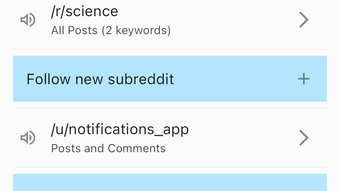
The user interface of Alerts is designed with simplicity and efficiency in mind, aligning with its utility-focused purpose. The layout emphasizes clear navigation and quick access to alert creation and management. Users can easily add, edit, or disable alerts through a clean, intuitive dashboard that minimizes unnecessary steps.
Visual style is minimalistic, relying on consistent typography and subtle color cues to differentiate active alerts from inactive ones. Navigation flows logically from the main screen to settings and alert configuration, with no apparent dead ends or confusing pathways. The app maintains responsiveness across various iPhone models, though the developer did not list formal performance metrics.
Although the developer did not specify minimum OS requirements beyond iOS 16.4, the app’s lightweight nature suggests stable performance on both newer and older devices. The app remains active and responsive during regular use, with no reported crashes or freezes. Push notifications are delivered promptly, indicating efficient background handling and system integration. Stability appears strong, though real-world testing across diverse devices has not been confirmed.
Platform Compatibility & Technical Requirements
Alerts is available exclusively for iPhone and runs on iOS 16.4 or later. The app is compatible with all iPhone models that support this operating system version, including the iPhone 14 series, iPhone 13, and earlier models with updated iOS. The current software version is 3.2.0, and the file size is 22.8 MB, making it a compact download ideal for users with limited storage.
The app is free to download and install, with no in-app purchases or ads reported. It is available only in English, which limits accessibility for non-English speakers. The developer did not specify additional technical requirements such as iCloud integration, background refresh settings, or required permissions. Compatibility information was not fully disclosed beyond the OS version.
Pros and Cons
- Free to download and install with no ads or in-app purchases
- Lightweight design (22.8 MB) with fast performance
- Real-time push notifications for timely updates
- Customizable alerts for keywords, subreddits, and posts
- Simple, intuitive interface designed for quick setup
- Secure and privacy-focused, with no data sharing reported
- Available only in English, limiting global accessibility
- Compatibility with iOS 16.4 or above may exclude older devices
- No official support for iPad or other Apple devices
- Developer did not provide detailed documentation or user guides
- Platform-specific limitations may restrict cross-device use
FAQ
Is Alerts safe to use on my iPhone?
Yes, the app is designed to be secure and does not require access to personal data beyond what is necessary for push notifications. No data sharing or tracking has been reported.
Can I use Alerts on devices other than iPhone?
As of now, the app is only available for iPhone. There is no official support for iPad, Android, or other platforms.
Do I need an internet connection to receive alerts?
Yes, a stable internet connection is required to receive real-time push notifications from Reddit. The app relies on active network connectivity to monitor content.
How often are alerts updated?
Alerts are triggered in real time whenever new content matches the user’s criteria. The app checks for updates continuously in the background when enabled.
Can I customize the type of alerts I receive?
Yes, users can create alerts based on specific keywords, entire subreddits, or individual posts, allowing for highly tailored notifications.
Final Thoughts
Alerts stands out as a focused, efficient utility for iPhone users who want to stay informed about Reddit without constant browsing. Its minimalist design, real-time alert system, and lightweight footprint make it a valuable tool for anyone seeking timely updates from their favorite communities. The app excels in simplicity and performance, delivering on its promise to help users avoid missing important posts.
While its limited language support and exclusive iPhone availability may restrict its reach, the app’s core functionality is solid and well-executed. For users who value precision, speed, and privacy, Alerts offers a reliable way to monitor Reddit content. It’s particularly beneficial for researchers, content creators, and professionals who rely on real-time insights.
With a free download, no ads, and a clean user experience, it represents strong value in the mobile app space. If you’re looking for a secure, fast, and customizable way to stay updated on Reddit, this app is worth trying.
Download Alerts now







